Different network.
Same shares.

Anchor 1.1 · Dual Path and Network Change

One server.
Two ways to connect.

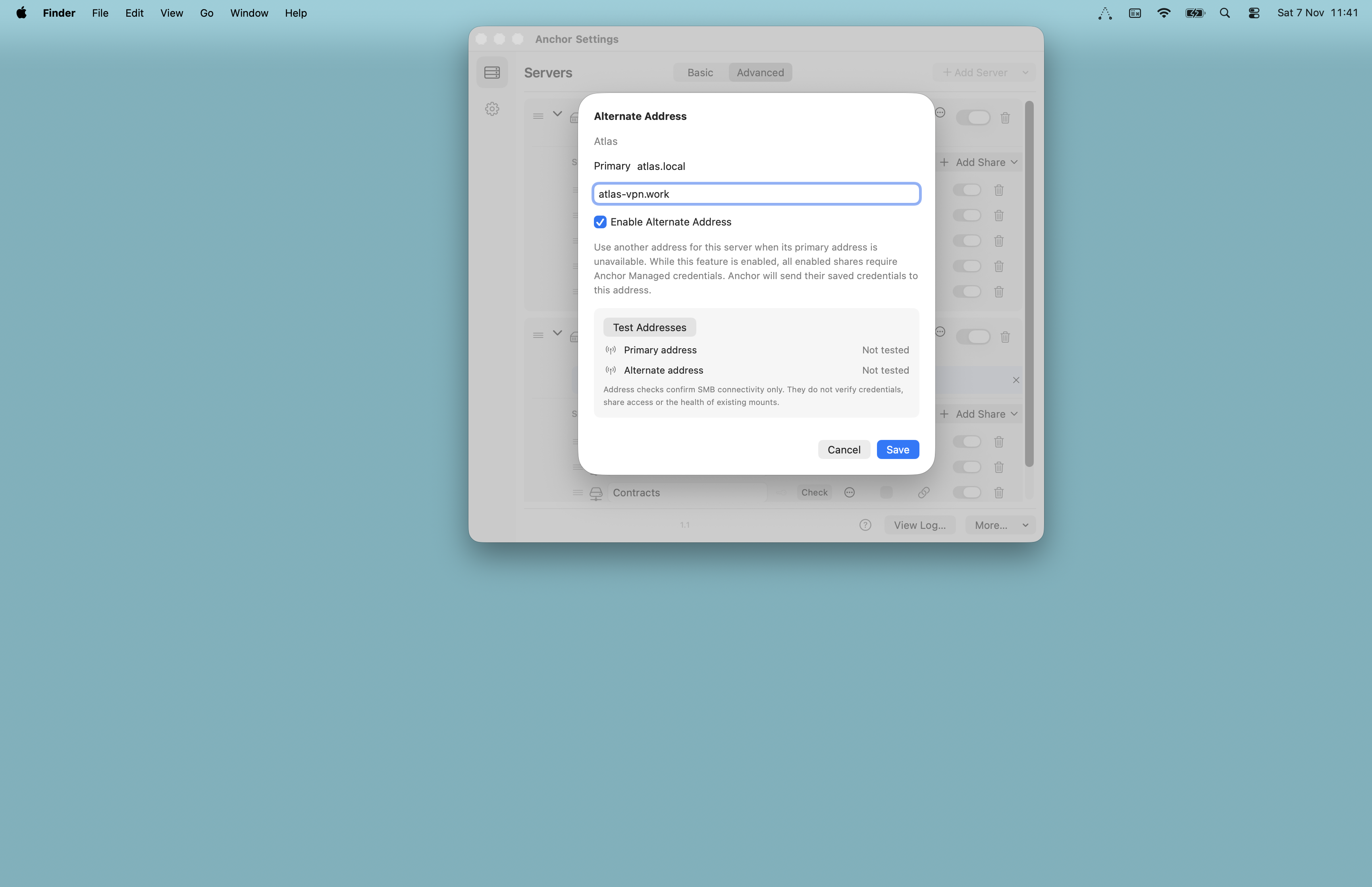
Add an Alternate Address for the same server, such as its Tailscale address.

Reach the same shares on your local network or over a VPN, all from one setup.

Alternate Address settings with Primary and Alternate fields and Test Addresses
Dual-path server settings · Dual Path requires Anchor Managed credentials.

Prepare. Switch. Carry on.

Moving between networks? Use Network Change before disconnecting.

Anchor remembers your mounted shares and safely unmounts them. Wait for Ready to change networks before switching.

Once the other route is available, Anchor restores those shares – even with Automount off.

Unexpected disconnect? Automount can reconnect eligible shares. If offered, use Reconnect now to retry.

Network ChangeGet your shares ready for a planned switch.
Reconnect nowRetry an interrupted connection when offered.

See the FAQ for setup and recovery details.

Familiar. A little clearer.

Updated Settings and the menu bar dropdown bring clearer organisation of servers and shares, active route and status feedback, and easier access to relevant controls. Everyday mounting and Automount stay familiar.

Custom server icons. Click a server’s icon in Settings → Servers to choose from nine options.

Advanced Settings beside the single-server menu bar dropdown
Current Settings and menu bar dropdown

Anchor

US$12.99

One-off licence. No subscription.

Shown in USD. Local currency and taxes calculated at checkout.

1 user · 3 Mac activations · 5 enabled servers

More than enough for most personal setups.

What’s included

  • New: Dual-path addressing for local and VPN connections
  • New: Network Change to prepare and restore mounted Dual Path shares
  • New: Reusable Anchor Managed credentials for shares on the same server
  • New: Custom server icons – choose from nine icons
  • Updated: Up to five enabled servers
  • Updated: Refreshed Settings and menu bar dropdown
  • No fixed limit on shares per server
  • Quiet automount without opening Finder
  • Mount or open shares straight from the menu bar
  • Automatic recovery after sleep, network or server interruptions
  • Pause shares or whole servers without removing them
  • Drag-and-drop reordering for servers and shares
  • Secure credentials in macOS Keychain
  • Live status and activity logging
  • Unmount All before you disconnect or head out
  • Status at a glance in the menu bar

Need more servers? Get in touch.

Team or organisation? Contact us.

Try Anchor on
your network.

Start a fully functional 14-day trial. No account or card required. Use Anchor with your own setup, in your own time. If it earns its place, we’re here when you’re ready.
Download